TL;DR
- This free workbook tracks UAT scenarios by business process, with testers, results, retests, defects and sign-off.
- A retest overrides run 1, and the sign-off answer reads Yes only when every check passes, not just the pass rate.
UAT status often lives in a long email thread, and nobody can say whether the project is ready. My UAT test plan template is a working workbook. You log each result once, and it rolls up by process and answers the sign-off question.
Download the UAT test plan template. It is a plain .xlsx with no macros and no sign-up. It is built for ERP projects, so the sample scenarios are real Dynamics 365 business processes and not generic software tests.
Video walkthrough
This short captioned walkthrough moves through the working sheets in order. It starts with a scenario that failed and failed again on retest, then shows the rollup by process, and ends with the strict sign-off answer on the dashboard. Watch it before you open the file if you want the shape of it quickly.
Who this plan is for
I wrote this for test leads and project managers who run UAT on an ERP project and need one view of where it stands. It suits a customer test lead working with a partner, or a partner who needs a clear answer for the steering group. It helps most in the weeks just before cutover.
Microsoft says UAT is the final type of test you do before you deploy. It is always manual, and business users do it. It needs customer data, including migrated data, and the latest solution version. It is also a prerequisite to reach go-live.
So the plan depends on two other pieces of work. Your data has to be in the test environment, which my guide on how to migrate data to Dynamics 365 covers. Your schedule has to leave room for it, which my ERP implementation project plan template shows. If you want help running the work, our services page explains how we work with project teams.
What is in the workbook
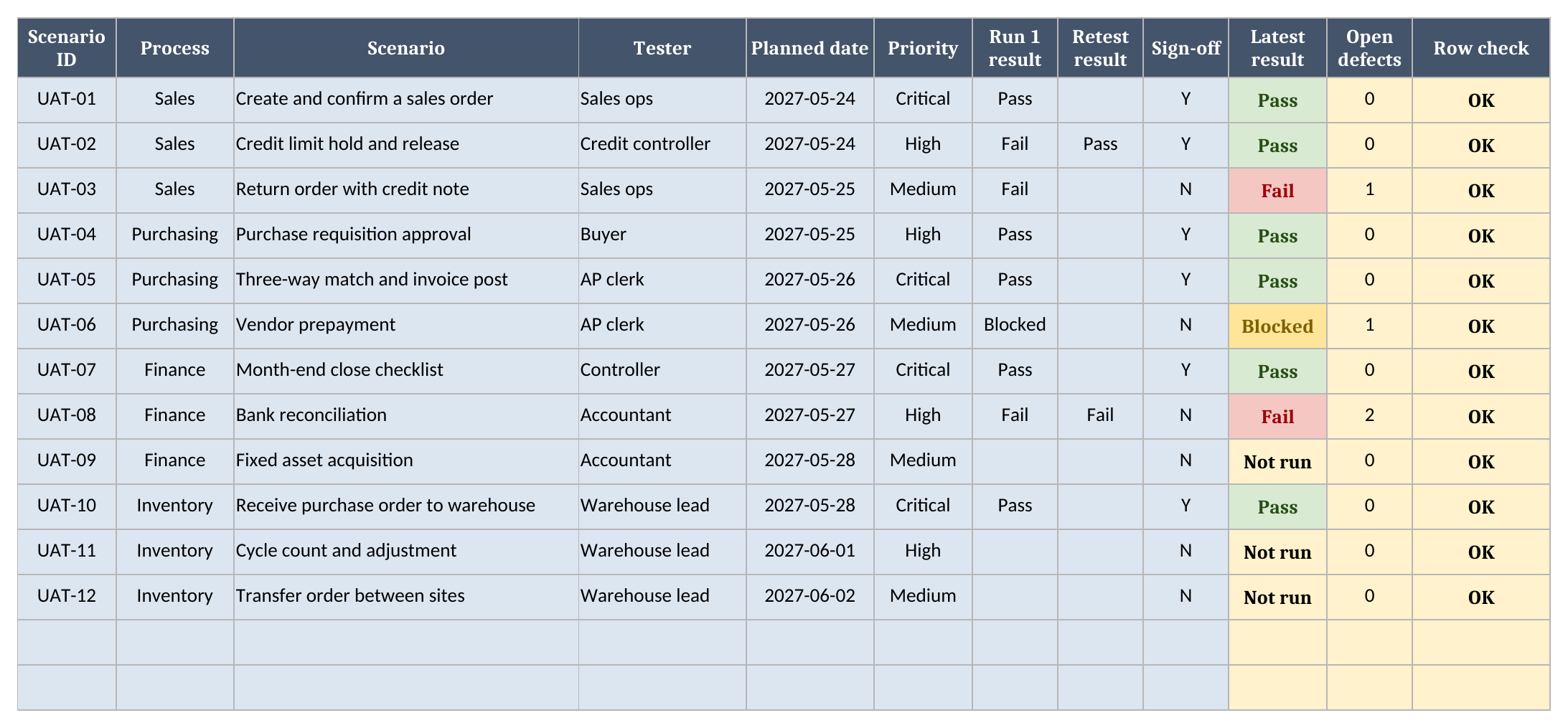
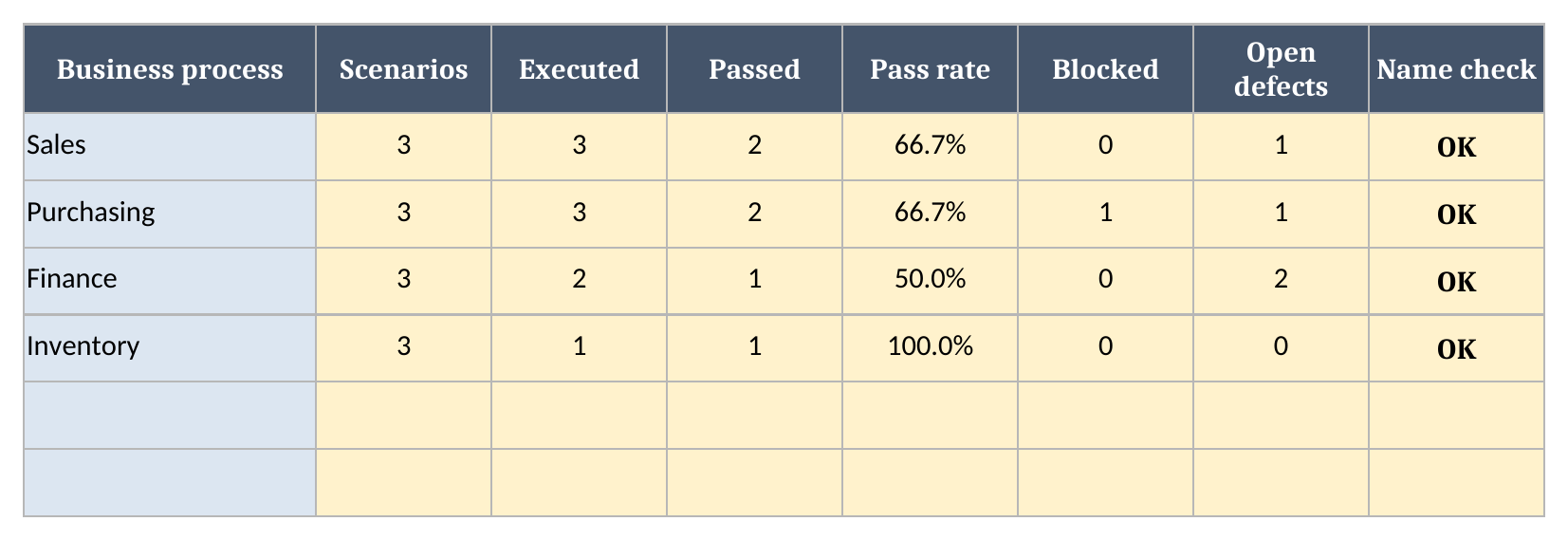
There are five sheets in a fixed order, and each one does a single job. Instructions covers setup and limits. Scenarios holds one row per test. Defects holds what those tests found. Processes rolls the results up by business process. Dashboard holds the report date, the threshold and the headline numbers that this page quotes from the sample.
- Instructions covers setup and the import route.
- Scenarios has one row per test.
- Defects has one row per defect.
- Processes has one row per business process.
- Dashboard has the report date and the results.
How to set it up
Setup takes a few steps, and you should do them in order, because Scenarios reads the process list and the Dashboard reads every sheet. Start by listing your business processes, then replace the sample tests with your own, and finish by setting the report date and the pass-rate threshold you have agreed with the people who will sign.
- If Excel opens the file in Protected View, click Enable Editing so the formulas calculate.
- On Processes, replace the sample processes with your own.
- On Scenarios, replace the sample rows. Give each one a process, a tester, a planned date and a priority.
- Log run 1 as Pass, Fail or Blocked. Log a retest only when you rerun it.
- On Defects, log each defect against its Scenario ID, with a severity and a status.
- On Dashboard, set the report date and the threshold.
When you add a scenario, type it in the next empty row. The calculated columns are already filled down to the last row, so you never need to copy a formula. The same is true on Defects and Processes, so a new row counts as soon as you type its ID.
Set up the test environment before anyone logs in. Our guides on accessing a Dynamics 365 sandbox and role-based access in Dynamics 365 help here. Test with the roles people will really use, because a scenario that only passes for an administrator proves very little.
How retests and the latest result work
The latest result reads the retest when one is filled in, then run 1, then Not run, so a retest overrides the earlier failure and nobody has to delete anything. Executed counts every scenario with a result, including Blocked. Pass rate divides passed by executed, and it reads n/a when nothing has run, because a zero there would mean something else.
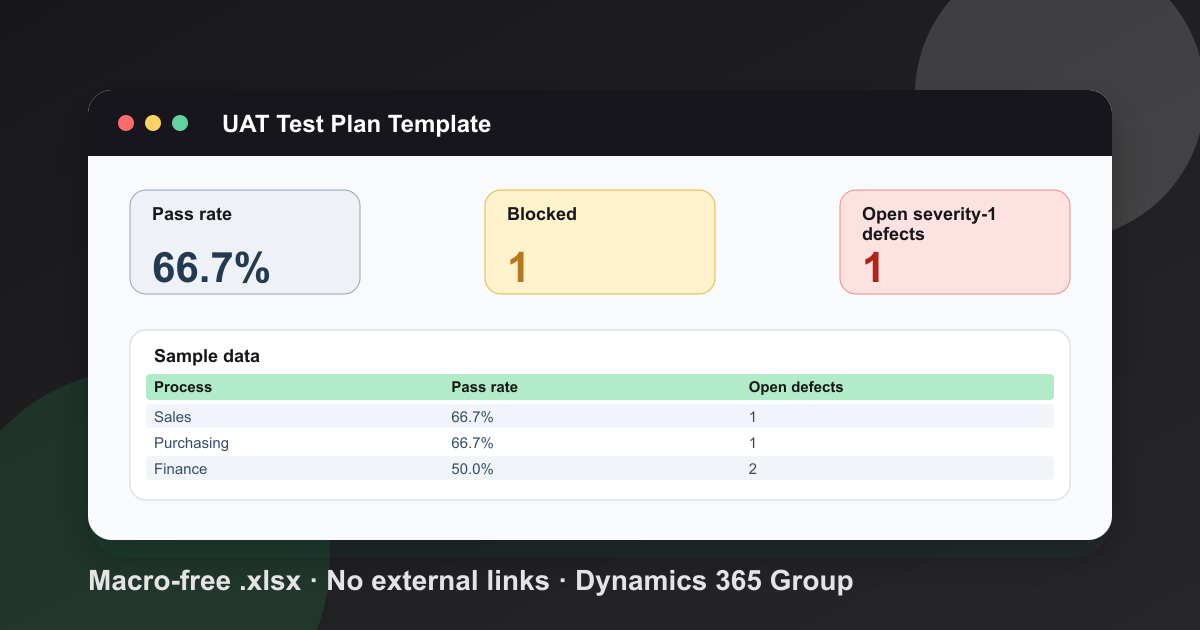
In the sample, 6 of 9 executed scenarios pass, so the pass rate is 66.7%. Sales reads 66.7%. UAT-02 failed on run 1 and passed on retest, so it counts as a pass. UAT-08 failed twice and carries 2 open defects, so it counts as a fail.
When UAT is ready for sign-off
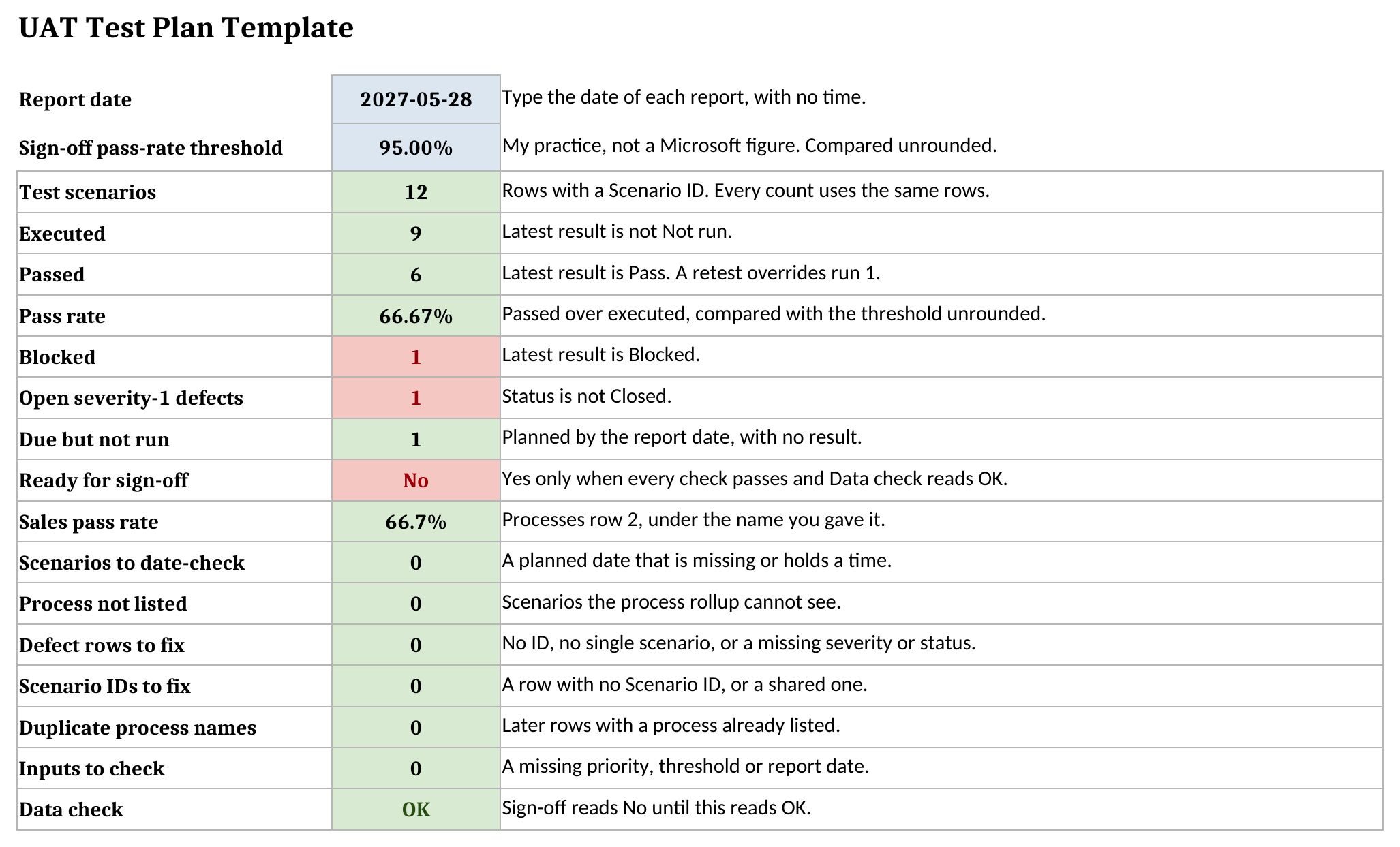
The sign-off answer reads Yes only when every check passes, because a good pass rate can hide a single failure that stops the business. The pass rate must meet your threshold. Nothing may be blocked, no severity-1 defect may be open, nothing may be overdue, every Critical scenario must pass on its latest result, and Data check must read OK.
The sample threshold of 95.0% is my own practice, not a Microsoft figure, so agree yours before testing starts. As of 2027-05-28 the sample answer is No. It has 1 blocked scenario, 1 open severity-1 defect and 1 scenario due but not run.
| Metric | Value |
|---|---|
| Test scenarios | 12 |
| Executed | 9 |
| Passed | 6 |
| Pass rate | 66.7% |
| Blocked | 1 |
| Open severity-1 defects | 1 |
A blank planned date reads Check date and stops the answer, because a scenario with no date can never count as due. A blank report date, a date with a time on it, or a blank threshold does the same. The pass rate compares unrounded, so a rate that displays as the threshold can still read No.
How to write good scenarios
Write each scenario as one business task with a clear result, and name it the way the business does, because the people running it are not testers by trade. Microsoft says a test plan defines the scope, types, cycles and outcomes of testing, and that plans should go deeper on processes that are critical or risky.
Microsoft also says the business users who do UAT should be trained first, which helps them avoid errors caused by unfamiliarity. So schedule training before the first run. The Dynamics 365 upgrade process is worth reading too, because later updates need the same scenarios run again.
Using it in Google Sheets
The workbook is a plain .xlsx file with no macros, and Google Sheets can import it. Choose File, then Import, then Upload, pick the file, and choose Insert new sheet(s). After importing, check the dropdowns, the status colours and the Dashboard results before you use your copy for a real test cycle.
What the plan does not do
This is a spreadsheet, so it has limits worth stating before you rely on it for a sign-off. It does not run tests or hold your test steps and evidence. Keep those in your test tool. It does not notify anyone when a defect is fixed. It holds up to 499 scenarios, 499 defects and 20 processes, because the formulas stop there.
The workbook warns you instead of guessing. Dashboard counts missing dates, unlisted processes, defects with no single scenario or no severity, missing or shared Scenario IDs, repeated process names and missing inputs. Any of them stops the sign-off answer until Data check reads OK. Names and IDs are matched exactly, so a * or ? you type counts as an ordinary character. More free tools sit on our tools page, and you can download the UAT test plan template when you are ready.
Frequently Asked Questions
What should a UAT test plan include for an ERP project?
The scenarios by business process, a tester and a planned date for each, the results and retests, the defects, and what sign-off needs. Microsoft says a test plan defines the scope, types, cycles and outcomes of testing.
Who should run user acceptance testing?
Business users. Microsoft says UAT is a manual test done by business users, and that they should be trained on the solution before they start.
How does the template handle a retest after a failed run?
A retest result overrides run 1. The latest result is the retest when one is filled in, otherwise run 1, otherwise Not run.
Does the template work in Google Sheets?
The file is a plain .xlsx with no macros. In Google Sheets use File > Import > Upload and choose Insert new sheet(s). After importing, check the dropdowns, status colours and Dashboard results before using the workbook.
When is UAT ready for sign-off?
In this workbook, only when the pass rate meets your threshold, nothing is blocked, no severity-1 defect is open, nothing is overdue, every Critical scenario passes and Data check reads OK.
Free tool
Calculate Your Dynamics 365 Migration ROI
See how much you could save with a free, instant ROI estimate. No signup required.