TL;DR: The fastest path to hands-on experience in Microsoft Dynamics CRM combines a Microsoft trial environment, Microsoft Learn exercises, and one small portfolio project. Practise the same workflow from several angles: configure the data model, enter records, automate a process, apply security, and report on the result.
Hands-on skill develops by completing realistic tasks, not by watching product tours alone. Start with a narrow scenario such as managing sales leads or service cases. Build it in a non-production environment, record the choices made, test it with sample users, and correct the parts that fail.
A useful practice project has a clear business outcome. For example, create a lead-to-opportunity process for a fictional distributor, add validation for required information, assign access by role, and build a dashboard for the sales manager. That single scenario exercises configuration, data quality, security, automation, and reporting together.
Community discussions can help when a feature behaves differently from the training material. Treat forum answers as leads to test in the practice environment, then confirm important behavior against Microsoft documentation before using it in a real implementation.
Understanding Microsoft Dynamics CRM
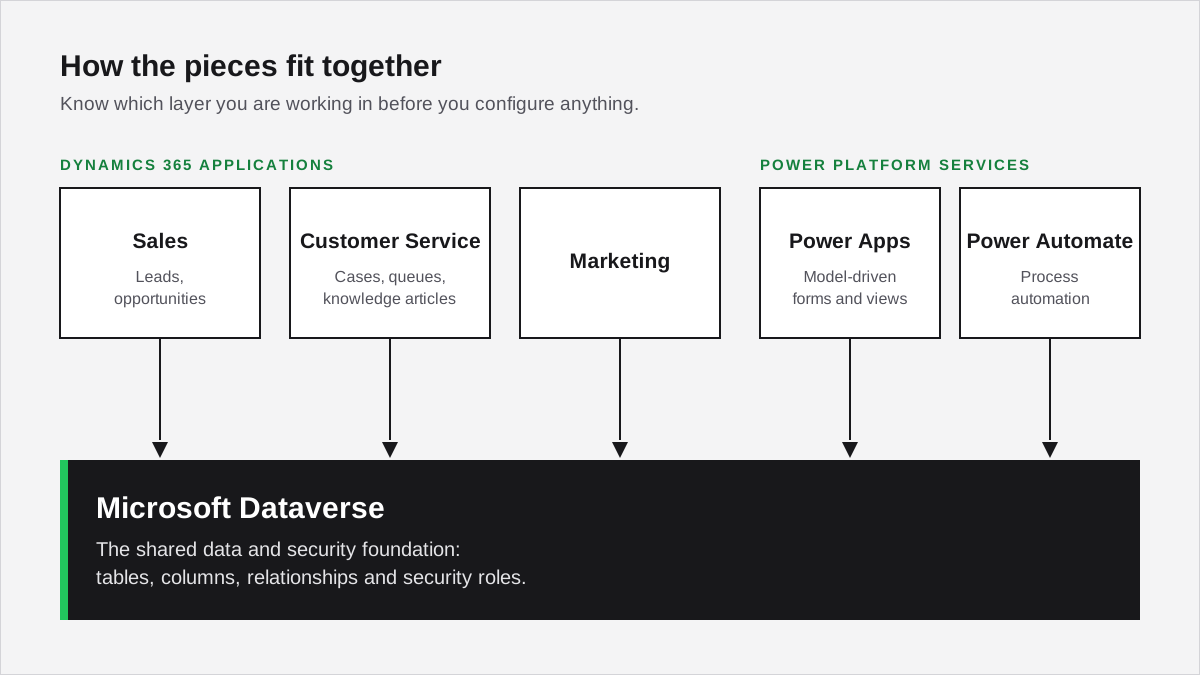
Microsoft Dynamics CRM now sits within the Dynamics 365 and Power Platform product family. Before configuring anything, learn how sales, customer service, marketing, Dataverse, Power Apps, and Power Automate relate to one another. That map prevents practice time from being spent in the wrong application or administration area.
Core Components of CRM
Dynamics 365 applications store customer and process data in Microsoft Dataverse. Sales work commonly uses accounts, contacts, leads, opportunities, activities, and products. Customer service work adds cases, queues, entitlements, and knowledge articles. Each application provides model-driven forms, views, charts, dashboards, and process controls around that data.
Begin by tracing one record through a complete process. Create an account and contact, qualify a lead, update an opportunity, schedule an activity, and review the resulting dashboard. For service practice, create a case, route it to a queue, record the resolution, and search a knowledge article.
Configuration determines how those processes fit an organization. Tables, columns, relationships, forms, views, business rules, and security roles shape what users can enter and see. The reporting requirements should be considered while designing the data model, not added after inconsistent data has accumulated.
CRM Versus Dynamics 365
“Dynamics CRM” is still used as a general term, but current implementations usually refer to specific Dynamics 365 customer engagement applications and Power Platform services. Dynamics 365 Sales and Customer Service address different processes, while Dataverse supplies the shared data and security foundation.
This distinction matters during training. A learner preparing for sales consulting should spend more time on leads, opportunities, forecasting, and sales processes. An aspiring platform developer should add Dataverse APIs, plug-ins, client scripting, solution management, and application lifecycle practices.
Getting Started with Dynamics 365
Start with an official trial or learning environment and a written practice scenario. The first session should produce working records and a visible business result, not a tour of every menu. A small, repeatable exercise makes it easier to identify gaps and rebuild the solution without carrying early mistakes forward.
Signing up for Dynamics 365
Use the Microsoft Dynamics 365 getting-started page to find the current trial and product options. Availability and signup requirements can vary, so follow the instructions for the specific Dynamics 365 application being studied. Use a non-production tenant and sample data; never practise with live customer records.
Pair the environment with Microsoft Learn. Choose a learning path aligned with a target role, then reproduce each exercise without the instructions open. If a task cannot be repeated from memory, note the missing step and practise it again rather than rushing to the next module.
Set an initial project backlog with five concrete outcomes:
-
Create the core customer and transaction records.
-
Adjust a form and view for the scenario.
-
Add one validation or business rule.
-
Configure access for two different user roles.
-
Build a chart or dashboard that answers a business question.
Microsoft community forums and immersion-style workshops can supplement this work. They are most useful when the learner arrives with a specific configuration problem, attempted solution, and reproducible result.
Navigating the Dynamics CRM Environment
Learn the interface by following records through a business process rather than memorizing navigation labels. Open an app, locate a view, inspect a record, create an activity, and use search to find the result. This approach builds familiarity with the areas that users touch during everyday sales and service work.
Understanding the Interface
The exact navigation depends on the selected model-driven app and its configuration. Most environments provide an app selector, left-side navigation, views, record forms, command bars, search, dashboards, and settings. The Microsoft overview of CRM provides product context, while the environment itself shows how a configured app behaves.
Practise navigation with timed retrieval tasks. Find all open opportunities for an account, filter a view by owner, open the related activities, and create a follow-up appointment. Then repeat the exercise using search and recently viewed records. Speed should come from understanding relationships and views, not from skipping data checks.
Personalization and Configuration
Personalization changes an individual user’s experience; configuration changes the application for a wider group. Test both separately. Adjust personal settings or a dashboard, then make a solution-based change to a form, view, or table so the difference is clear.
Create at least two test users with different security roles. Verify which records, columns, and commands each user can access. Security work should be tested by signing in as the affected user, because an administrator’s access can hide permission problems.
Hands-on Dynamics 365 Customization
Build customization skill by changing one business requirement at a time and testing the effect as an end user. Tables and columns establish the data model; forms and views shape interaction; business rules apply simple interface logic. Keep each change in a solution so it can be reviewed, moved, and removed cleanly.
Customizing Entities and Fields
In current Power Platform terminology, entities are called tables and fields are called columns. Use the Power Apps maker portal to create a custom table only when standard tables do not represent the requirement. Before adding anything, define the record’s purpose, owner, lifecycle, relationships, and reporting needs.
Choose column types carefully. A choice column suits a controlled set of values, a lookup creates a relationship to another table, and a date column needs a clear time-zone behavior. Mark required data deliberately; making every useful field mandatory often creates poor data-entry habits rather than better information.
After adding columns, update the relevant forms and views. Enter sample records, sort and filter the view, export or report on the data, and check the experience with each test role. These checks reveal design problems earlier than a form-only review.
Implementing Business Rules
Business rules can set values, change requirement levels, show or hide fields, and validate data without custom code. Start with a single condition and expected outcome, such as requiring a reason when an opportunity is marked as lost. Confirm where the rule runs and which forms or tables it affects.
Test the rule with records that meet and do not meet the condition. Also check existing records, imported data, and users with different roles when those paths matter. If the requirement needs complex server-side processing, integration calls, or transaction control, a business rule may not be the right mechanism.
Practical Experience through Microsoft Learn
Microsoft Learn provides the strongest starting point for structured, no-cost Dynamics 365 study because its modules are organized around products and roles. Use each module as a lab brief: complete the guided work, rebuild it independently, and then alter one requirement. Independent repetition turns a demonstration into a usable skill.
Learning Paths and Modules
Choose modules that match the application and role being targeted. A functional consultant might prioritize process configuration, security, data management, and reporting. A developer should add Dataverse development, client extensions, plug-ins, integrations, and solution deployment.
Some learning experiences use sandbox environments, while others expect access to a tenant or provide only conceptual instruction. Check the prerequisites before starting. When a hosted environment is unavailable, reproduce the exercise in an authorized trial or developer environment.
Use a short evidence log for each module:
-
The business problem addressed
-
The configuration or code created
-
The test record and expected result
-
One failure encountered and how it was diagnosed
-
One variation completed without instructions
That log becomes useful interview material because it explains decisions and troubleshooting, not merely course completion.
Certifications to Validate Your Skills
Certification can validate a defined set of product knowledge, but it does not replace implementation practice. Select a credential only after choosing a role, then use its current skills outline to identify lab exercises. Microsoft changes its certification portfolio over time, so confirm active credentials and exam requirements in the official catalog.
For every objective, create a proof task. If the outline mentions security, configure roles and test access. If it covers automation, build and troubleshoot a process. If it covers data management, import a small dataset, handle errors, and verify relationships. The resulting portfolio demonstrates more than memorized terminology.
Expanding Your CRM Skills
Expand beyond basic CRM configuration by connecting Dynamics 365 to the Power Platform and another business system. Begin with low-risk exercises that use sample data and documented connectors. The goal is to understand data ownership, trigger behavior, security, error handling, and support responsibilities across the whole process.
Working with Microsoft Power Platform
Power Apps, Power Automate, and Power BI extend what can be built around Dataverse and Dynamics 365 applications. Practise each tool with a focused result:
-
Power Apps: Create a small canvas app or refine a model-driven app for a specific user task.
-
Power Automate: Send a notification when a qualified record meets a defined condition, then test duplicate and failed runs.
-
Power BI: Build a report that answers one operational question using clean sample data.
Package related components in a solution and document their dependencies. This habit matters when moving work between environments and when another administrator needs to understand what a change contains.
Integrating with Business Applications
Integration practice should begin with system boundaries, not connector selection. Define which application owns each field, what starts the exchange, how records are matched, what happens when data is missing, and how failures are retried or reported.
Suitable practice projects include synchronizing a small set of contacts with Outlook, sending approved CRM data to a sample finance process, or passing a qualified lead to a marketing workflow. Use test accounts and synthetic records throughout.
For each integration:
-
State the business outcome and data owner.
-
Limit the initial field set and record volume.
-
Test creation, update, duplication, deletion, and failure paths.
-
Record credentials, connections, dependencies, and support steps without storing secrets in the document.
Building Solutions
Build a complete Dynamics 365 solution by translating a short business brief into data, interface, security, automation, and reporting components. A coherent solution reveals design tradeoffs that isolated tutorials miss. Keep the first version small enough to rebuild, test with multiple roles, and explain from requirement through deployment.
Designing and Implementing Solutions
Start by mapping the process and naming the records involved. Identify standard tables before proposing custom ones, then define relationships, ownership, required data, status transitions, and reporting questions. Create the work inside an unmanaged solution in the development environment.
A good portfolio example might include a custom inspection process related to an account. It could use a form for data entry, a view for open inspections, a rule that requires follow-up details, role-based access, and a dashboard showing results. The documentation should explain why each component exists.
Include data movement in the exercise. Prepare a small source file, clean it with Power Query where appropriate, import it, review failures, and verify lookups. For deeper guidance, the Dynamics 365 CRM migration guide covers the surrounding process.
Pre-validation Plugin and Custom Workflows
Code-based extensions are appropriate when declarative tools cannot meet a server-side requirement cleanly. A pre-validation plug-in can reject an invalid operation before the main database transaction, but the execution stage must be chosen from the actual requirement rather than from a tutorial pattern.
Set up a development project in Visual Studio, use source control outside the practice tenant, and register code only in a non-production environment. Write a small plug-in with a clearly defined message, table, stage, filtering attributes, input conditions, and error behavior. Add tracing so failures can be diagnosed.
Custom workflow activities may still appear in existing implementations, while newer designs may use other automation options. Learn to assess the current architecture before adding another extension. Test synchronous behavior, asynchronous behavior, permissions, duplicate execution, failure handling, and deployment dependencies.
Community Resources and Staying Current
Use Microsoft documentation for product behavior and community channels for troubleshooting ideas, examples, and peer discussion. Dynamics 365 changes regularly, so every answer should be checked against the product version and application in use. A tested explanation from a recent environment is more useful than an old snippet copied without context.
Engaging with Dynamics 365 Community
The Microsoft Dynamics 365 Community can help with specific product questions. Search for the exact error and application before posting. A useful question includes the goal, environment type, relevant configuration, steps already attempted, observed result, expected result, and any sanitized error details.
Local user groups and professional networks can provide project feedback and exposure to different implementation patterns. Bring a small design or troubleshooting case rather than asking for general career advice. Comparing two concrete approaches produces more actionable feedback and makes it easier to explain the final decision.
Staying Updated with Product Updates and Events
Create a repeatable update routine. Review official release plans and application documentation, identify changes relevant to the practice project, and test them in a sandbox before adjusting the design. The Microsoft Tech Community can add implementation discussion, but important behavior should still be verified against official documentation and the target environment.
Webinars, conferences, and product events are most useful when followed by a lab. Select one announced feature, document its prerequisites, enable it safely if available, and test a realistic scenario. This converts release awareness into operational understanding.
Best Practices and Expert Insights
Use a business requirement, the simplest suitable platform feature, and a testable acceptance criterion for every change. Prefer standard capabilities when they meet the need, but do not treat “out of the box” as an automatic answer. Maintainability depends on clear ownership, controlled solutions, documented dependencies, and repeatable testing.
Adopting Industry Best Practices
Begin with process discovery. Identify who performs the work, which record starts it, what decision is made, what data is required, and how success is measured. This prevents forms and automation from being built around assumptions.
For implementation practice, apply these habits:
-
Reuse standard tables and features when they fit the requirement.
-
Keep custom components focused and name them consistently.
-
Build changes in solutions and record dependencies.
-
Clean and validate data before import.
-
Test with representative user roles and sample records.
-
Document the expected result and rollback approach.
User training should be task-based. Ask a test user to complete a realistic process without coaching, observe where the design causes hesitation or error, and adjust the application or instructions. Adoption problems often expose design issues that administrator-only testing misses.
Preparing for Dynamics CRM Job Roles
Prepare for a Dynamics CRM role by matching practice projects to the work employers expect from consultants, administrators, and developers. All three paths need product knowledge and troubleshooting, but their evidence differs: consultants explain process decisions, administrators demonstrate safe configuration, and developers show maintainable extensions and integrations.
Understanding the Consultant Role
A functional consultant translates business processes into Dynamics 365 configuration. Practice interviewing a fictional stakeholder, mapping the current and proposed process, identifying gaps, and presenting a solution with assumptions and risks. The configuration should support the documented process rather than lead it.
Strong portfolio evidence includes:
-
A process map and concise requirements list
-
A configured scenario using standard features where appropriate
-
Security and data-migration considerations
-
User acceptance tests with expected results
-
A short demonstration that explains tradeoffs clearly
Interview exercises often use a case rather than a list of product questions. Practise asking clarifying questions, separating requirements from preferences, and stating which details would need validation before implementation.
Skills for the Administrator and Developer Positions
Administrators should practise environment management, user access, security roles, data import and export, auditing, duplicate detection, solution movement, and routine troubleshooting. Each exercise should include a least-privileged test user and a recovery step.
Developers need the platform concepts behind C#, JavaScript, web APIs, authentication, plug-in execution, integrations, testing, and application lifecycle management. A detailed progression is available in the guide on how to become a Dynamics 365 developer.
Use Microsoft Learn’s Dynamics 365 training paths to identify relevant topics, then turn them into a portfolio project. Include source files, a component inventory, test evidence, deployment notes, and a plain-language explanation of the business requirement. Remove credentials, tenant identifiers, and customer data before sharing any artifact.
Frequently Asked Questions
Which training courses are recommended for hands-on experience with Microsoft Dynamics 365?
Start with the official Microsoft Learn material for the Dynamics 365 application that matches the target role. Complete the guided exercises in a trial or practice environment, then build a small project that covers data setup, security, automation, and reporting. Check the current Microsoft course catalog before enrolling because course names and availability can change.
What certification paths are available for someone focused on Microsoft Dynamics 365?
Microsoft offers role-based credentials for Dynamics 365 and the Power Platform. The appropriate path depends on whether the target role is functional consulting, administration, development, sales, or customer service. Review the current Microsoft Credentials catalog before planning study, since certifications and exams can be introduced, renamed, or retired.
Are any Microsoft Dynamics 365 training materials available for free?
Yes. Microsoft Learn provides free Dynamics 365 learning paths, modules, knowledge checks, and some interactive exercises. A Microsoft trial environment can provide additional product practice when available. Access conditions vary by module and product, so check each learning path before assuming that it includes a hosted exercise environment.
What are the necessary steps to become a certified Microsoft Dynamics professional?
Choose a role, confirm the current certification requirements in the Microsoft Credentials catalog, complete the relevant Microsoft Learn material, and practise the exam objectives in a non-production environment. Take the required assessment only after the configuration tasks can be completed without relying on step-by-step instructions.
How long would it typically take an individual to proficiently learn Microsoft Dynamics CRM?
There is no reliable universal timetable. Progress depends on prior CRM knowledge, the chosen Dynamics 365 application, weekly practice time, and the depth required by the target role. Use task-based milestones instead: configure tables and forms, secure records, automate a process, create a report, and explain the design decisions.
What kind of salary might a developer specializing in Microsoft Dynamics CRM expect?
Compensation varies by country, city, seniority, employment type, industry, and technical specialism. Use current salary data from several sources in the relevant region, then compare roles with similar responsibilities rather than relying on a single global figure. Job listings can also show which Dynamics skills employers currently value.
Free tool
Calculate Your Dynamics 365 Migration ROI
See how much you could save with a free, instant ROI estimate. No signup required.